Exploring VFX Graph in WebGPU
12 July 2024
This is a simple feature demo that shows Unity running VFX Graph in-browser with its experimental WebGPU renderer.
Previously, to get a Unity game running on canvas, you’d need to use the WebGL graphics API which didn’t support compute shaders, which VFX Graph needs to run. However, WebGPU does support compute shaders.
As of Unity 6000.0.9f1, you could enable WebGPU support by inserting the
following line into the ProjectSettings/ProjectSettings.asset file:
  ...
  webGLMemoryGeom...
  webGLEnableWebGPU: 1
  webGLPowerPrefe...
  ...
Then just activate it in Project Settings/Player:
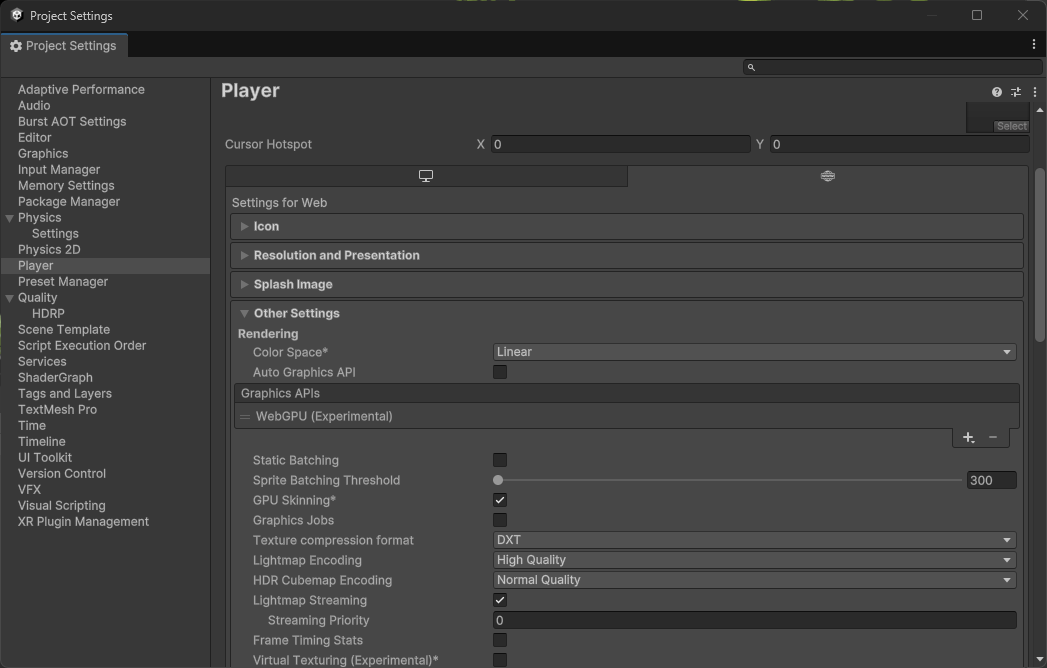
Unfortunately, it doesn’t seem like WebXR in WebGPU is supported yet, so this can’t be used in XR applications. In those cases, it’d still be preferable to run the app natively with the Vulkan graphics API.
Added 2024-07-15: Unfortunately as of Unity 6000.0.9f1 it doesn’t seem
like rendering particle strips is supported yet either. There may also be
some problems with running GPU events nested more than two deep.